Didn't belive it at first but this program really recoverd PSD file that Photoshop wasn't able to open displaying some random error. Saved couple hours of work thanks to this. Highly recommend - even though overall web and soft look is really outdated it just does its job. Thanks!
How to repair Photoshop PSD file online
To repair a corrupted file containing a Photoshop project online:
- Press the Select file button and select a Photoshop file with the extension .psd
- Wait for the corrupted Adobe Photoshop file to be repaired
- Download the PSD file containing the repaired Photoshop project
The data repaired from corrupted Photoshop graphical projects is stored by the online service in a new file with the .psd extension.
You can now repair data from files containing Adobe Photoshop graphical projects on any device with a browser.
Overview of programs and online services for repairing damaged Adobe Photoshop PSD files: practical effectiveness analysis
Recovery Toolbox conducts a large-scale quarterly study aimed at determining the actual effectiveness of various programs and services designed to recover damaged PSD files created in Adobe Photoshop and improving the quality of data recovery using the online service and the Recovery Toolbox for Photoshop program. Unlike laboratory tests with artificially created damage, this study used real user files that were uploaded to a special cloud service: https://photoshop.recoverytoolbox.com/online/
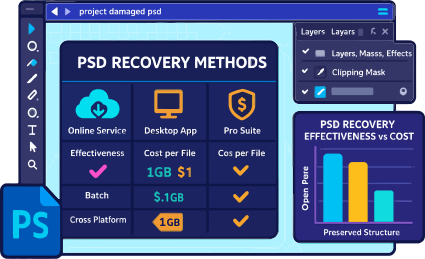
In total, more than 1,000 PSD files uploaded by users from around the world were tested. The file sizes often exceeded 1 gigabyte, which makes the recovery task particularly difficult — especially when there are multiple layers, masks, effects, and a complex document structure.
Testing methodology
The files were not filtered or sorted: the researchers worked with what users uploaded. This means that the sample included files with varying degrees of damage, from minor errors to documents that could not be opened at all.
Both installation utilities and online recovery tools were used in the testing.
Among them:
- Recovery Toolbox for Photoshop (desktop version)
- Recovery Toolbox online service https://photoshop.recoverytoolbox.com/online/
- PSD Repair Kit
- OnlineFile Repair for Photoshop https://www.onlinefile.repair/photoshop
- Online File Repair https://onlinefilerepair.com/photoshop
- SecureRecovery® for Photoshop
- DataNumen PSD Repair
Each tool was tested on the same set of files. This made it possible to objectively compare which of the utilities was able to recover more data, preserve the document structure, and correctly restore layers, masks, and other PSD elements.
What was evaluated during the recovery process:
- Was it possible to open the file after recovery?
- Was the document structure preserved: the number and order of layers?
- How correctly were text and graphic elements recovered?
- Were masks, layer styles, effects, and transparency preserved?
- Were there any artifacts, damaged areas, or distortions?
Results
Based on the data obtained, a comparative table was compiled, indicating how successfully each tool coped with the task at hand. The results allow us to conclude whether it is advisable to use a particular program depending on the degree of damage to the PSD file and its complexity.
| Service or program | % of successfully recovered PSD files | Price for recovering 1 file | Comments |
|---|---|---|---|
| Online service Recovery Toolbox https://photoshop.recoverytoolbox.com/online/ | ~65% | $10 per 1 GB | Universal tool for all devices and operating systems. |
| Recovery Toolbox for Photoshop | ~63% | $25 | Only applicable for Windows |
| SecureRecovery® for Photoshop | ~29% | $59.99 | Online service available |
| Online service Online.repair | ~63% | $10 per 1 GB | Windows program available: PSD Repair Kit |
| Online service OnlineFileRepair.com | ~61% | $5 per 1 GB | |
| DataNumen PSD Repair | ~25% | $199.95 | Batch mode for processing large numbers of PSD files available |
Additional information:
- DataNumen PSD Repair provides a convenient batch repair feature that allows you to process multiple damaged PSD files in a single operation. This is especially useful when working with large amounts of data, saving time and reducing manual labor.
- SecureRecovery® for Photoshop software is distributed under a licensing model where the cost of the full version is comparable to the cost of recovering a single PSD document. This makes it a worthwhile purchase for those who plan to use the program repeatedly or work with a large number of damaged files.
Real customer reviews from TrustPilot
Victor G. Bobrov, Senior Software Engineer.
MCSD, MCDBA
Specialist in data recovery from Photoshop files. Expert in recovering damaged Adobe Photoshop PSD files with 20 years of experience.
Customer's reviews and ratings:
It surely helps people
Good
تستحقون العلامة الكاملة Bravo 10/10
Very nice working.
Everything went great, all the layers are in place, including the smart objects. I recommend this resource.
nice
very cool!
Photoshop crashed and destroyed all open files.
I recovered a 2GB file - a lot of work.
Ttool recovered all of my pictures. They were slightly fuzzy and failed to open when I used several tools such as MS Photos, Chipchamp, dtc. So far only Paint opens the full size pictures. But I do like how quickly and efficiently the tool works.
it was good
A life-saving tool!
I was sitting at night making a post in Photoshop on visualization. Almost finished... I decided to save. And a couple of minutes later the power went out. The file was damaged, the autosave was completely dead. I miraculously found this tool and by some other miracle it brought all my work back from the other world. At first, however, there were problems with saving the restored file. It turned out that I had to collapse all the smart objects, they introduced some kind of discord. But this is not a minus at all, just a note (indicated in the FAQ). I consider the price symbolic compared to the potential loss.
Endless thanks to the developers!
excelente
the app was soo good ,it gave our 19years old memories back again.
VERY GOOD
You've saved my life!!! You're the greatest!!!!
good
Smooth working
a little slow but convincing I managed to recover all my photos
Thank you so very much! You're lifesaver. I've restored my photos deleted by accident in 10 minutes!
The program helped to get rid of the error message, but created a different problem. The bitmap that was used as a background did not recover a bit. It's good that she was a separate layer.
What a thrill I got when the program started retrieving data from a corrupted PSD file.
The program fully justified the purchase.
Unfortunately, the program was unable to repair part of the drawing. I only got 70% of the corupted file
I don’t know about Windows XP, but on my good old Windows 7 the program started.
However, when using the program, it is advisable not to run other programs if you have a weak computer. This will allow you to shorten the file repair time.
I have already restored Illustrator vector graphics from you. It's time to check how you restore the bitmap. The PSD file turned into an EXE file after a virus, I renamed it and put the .PSD extension, but Photoshop CS6 could not open it. The virus damaged the file itself, as an error appeared when opening it. The file itself is small and recovered quickly. If you compare my previous experience, then I did not have any problems with fixing the .psd file.
I want to revert to a previous version of my saved Photoshop art. Unfortunately, in the demo version of the program, I could only see the current version of the .psd file.
I downloaded the trainingfiles for photoshop CS6 from the downloadlink in the ebook classroom in a Book.
It contains a large number of JPG files and video files.
The container file turned out to be corrupt sothat I could not unpack any file from it.
With Recovery Toolbox it was possible to reclaim all files exept one that remained corrupt.
So iI am happy with the tool.
I liked the program, the only remark is the viewing of the picture. Please, make it so that in the viewer, after the fix process, you can select PSD and see the whole image that has been repaired. It is inconvenient to select each layer and watch them separately.
All my .PSD files are corrupt, after I had virus on computer. Program helps repaired Photoshop documents. But unfortunately not all were correctly fixed. Total was restored 5 of 6 files. And one of five recovered files contains layers without masks
I restored the broken .PSD file after the error “is not compatible with this version of Photoshop”. This was after I tried to fix the hard drive errors. P.S in the restored file may contain layers with different properties, like mine
You guys/gals are the fucking bomb!!!!!!!!!!!!!!!!!!!!!!!!!!!!!!!!!!!!! I'm super sorry for my language, but oh sweet jesus!! I had 2 twelve hour days worth of work in a large psd that wouldn't open...
I had multiple heart attacks trying to figure it out. Called my boss freaking the fuck out... Just decided I was going to have to rebuild everything...
My boss calls me and says he found your website and fix tool. I told him it sounded like a bullshit virus...
He made me try your demo tool. I told him that I would blow every single one of you if your psd fix tool worked.
It did work, but now having relaxed a little, I don't think I can follow through with that promise. :)
I do love you though. All of you! Truly!!
When I opened the image, an error popped up that Photoshop does not support this format, the file seems to be damaged. Before saving the file, everything opened normally. Something went wrong when saving to Photoshop, and it saved my file with errors. After recovery, it was clear that my file was damaged by the brush plugin. Since all the new elements have been restored, except for the figures which were painted with a brush.
I downloaded your Adobe Photoshop recovery tool for PC (Windows). And while I was going through the recovery phase of the Photoshop file, I set the "Vector Mask Settings" option and clicked the "Restore" button, but some mask settings were not restored, they changed size. Some masks are large.
Lol, online service can fix a corrupted Photoshop document, after when Photoshop tries to saved file with a lot of replace unsupported fonts and brushes, which led to lost data of work and saved .psd file as corrupted.
My PSD file was repaired. But all Smart-objects need to re-assemble later in Photoshop CC. THNKS!!!
Thanks! Adobe .psd Photoshop CS6 file was repaired.
Tool assisted me a lot, I had many corrupted by various reason .psd files and didn't know to do. It learned me how overcome such issues.
It isn't compatible with some PC software configurations.
I managed to recover some of my old family albums. This software worked perfectly. Thanks